Showing posts with label droidz. Show all posts
Showing posts with label droidz. Show all posts
Wednesday, February 4, 2015
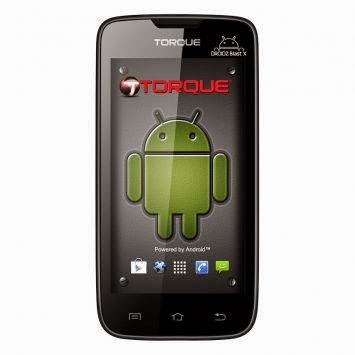
Hard Reset your Torque Droidz Blast and remove password pattern lock and gmail account
This tutorial is for Torque Droidz Blast. Not the Torque Droidz Blast X. You can check out the official picture for your reference.
Hard resetting / factory resetting your phone will solve the following issues:
1. If you forgot your pattern lock
2. If you forgot your gmail account
3. If you forgot your password
4. Apps that automatically force closing
5. Stuck in Torque Logo (sometimes does not work if the firmware is totally damage)
NOTE: Performing hard reset will erase your data.
To hard reset:
1. Turn off your phone
2. Press and Hold VOLUME UP + Power button simultaneously. You must Press the Power Button first before pressing the VOLUME UP and wait until you see a phone with exclamation mark.
3. Press Power Button or Volume up to activate Android System Recovery (I forgot the exact button to press, but its either of the two button)
4. Select wipe / factory reset, press Volume rocker to navigate and press the Power Button to confirm your selection.
5. Reboot your phone.
Note: If performing hard reset did not succeed, you need to wipe the cache first in the android system recovery before performing wipe / factory reset.
I hope this tutorial helps you.. If you have any question just drop a comment. If you have time please can you confirm the button to activate the Android System Recovery, so I can update the blog post. Thank you.
Read more »
Hard resetting / factory resetting your phone will solve the following issues:
1. If you forgot your pattern lock
2. If you forgot your gmail account
3. If you forgot your password
4. Apps that automatically force closing
5. Stuck in Torque Logo (sometimes does not work if the firmware is totally damage)
NOTE: Performing hard reset will erase your data.
To hard reset:
1. Turn off your phone
2. Press and Hold VOLUME UP + Power button simultaneously. You must Press the Power Button first before pressing the VOLUME UP and wait until you see a phone with exclamation mark.
3. Press Power Button or Volume up to activate Android System Recovery (I forgot the exact button to press, but its either of the two button)
4. Select wipe / factory reset, press Volume rocker to navigate and press the Power Button to confirm your selection.
5. Reboot your phone.
Note: If performing hard reset did not succeed, you need to wipe the cache first in the android system recovery before performing wipe / factory reset.
I hope this tutorial helps you.. If you have any question just drop a comment. If you have time please can you confirm the button to activate the Android System Recovery, so I can update the blog post. Thank you.

Wednesday, January 28, 2015
Remove password pattern lock gmail account in your Torque Droidz Avatar TV
Alright another tutorial for Torque, and this one is for Torque Droidz Avatar TV. This phone is like Galaxy S3.

Hard resetting / factory resetting your phone will solve the following issues:
1. If you forgot your pattern lock
2. If you forgot your gmail account
3. If you forgot your password
4. Apps that automatically force closing
5. Stuck in Torque Logo (sometimes does not work if the firmware is totally damage)
NOTE: Performing hard reset will erase your data.
To hard reset:
1. Turn off your phone
2. Press and Hold Volume UP +Power Button simultaneously
3. An Android with exclamation mark will appear, Press Power Button to activate recovery mode
4. Select wipe / factory reset, to navigate press the Volume DOWN, to select press VOLUME UP
5. Reboot your phone.
Note: If performing hard reset did not succeed, you need to wipe the cache first in the android system recovery before performing wipe / factory reset.
I hope this tutorial helps you.
Read more »
Hard resetting / factory resetting your phone will solve the following issues:
1. If you forgot your pattern lock
2. If you forgot your gmail account
3. If you forgot your password
4. Apps that automatically force closing
5. Stuck in Torque Logo (sometimes does not work if the firmware is totally damage)
NOTE: Performing hard reset will erase your data.
To hard reset:
1. Turn off your phone
2. Press and Hold Volume UP +Power Button simultaneously
3. An Android with exclamation mark will appear, Press Power Button to activate recovery mode
4. Select wipe / factory reset, to navigate press the Volume DOWN, to select press VOLUME UP
5. Reboot your phone.
Note: If performing hard reset did not succeed, you need to wipe the cache first in the android system recovery before performing wipe / factory reset.
I hope this tutorial helps you.
Subscribe to:
Posts (Atom)