Wednesday, March 11, 2015
Building applications on top of Google Apps
Two-legged OAuth (2LO) allows 3rd-party applications like SherpaTools to make authorized API calls to Google Apps on behalf of a user. Here is how we set up our Google Data API ContactsService that will be fetching User Profiles to use 2LO:
As long as our key/secret pair is correct and the Google Apps customer has entitled our OAuth key to have access to their Contacts API feed, Google authorizes SherpaTools to continue to make API calls. There are two other settings that should be mentioned in configuring the service to work well on GAE. First, since we are dealing with somewhat sensitive data, all calls to Google Apps are made over SSL. To ensure this, we simply set the useSSL flag for the contacts service. Next, the default request/response timeout on GAE for these API calls is only five seconds out of a possible ten. Since we will be retrieving as much data as we can within that ten second window to reduce the total number of operations to complete the work, we raise our connection timeout up to just short of that maximum, 9500 milliseconds:ContactsService contactsService =new ContactsService(GlobalConstants.APPLICATION_NAME);GoogleOAuthParameters parameters = new GoogleOAuthParameters();parameters.setOAuthConsumerKey(GlobalConstants.CONSUMER_KEY);parameters.setOAuthConsumerSecret(GlobalConstants.CONSUMER_SECRET);OAuthHmacSha1Signer signer = new OAuthHmacSha1Signer();try {contactsService.setOAuthCredentials(parameters, signer);} catch (OAuthException e) {// not expected if secret is up-to-date}
contactsService.useSsl();contactsService.setConnectTimeout(9500);
This constraint restricts all urls starting with /task/ to only be accessible either from system calls such as from the Task Queue or by admins. The NONE transport guarantee is also important to mention. We initially attempted to encrypt our task calls using SSL with a transport guaranteed of CONFIDENTIAL, but, at the time we attempted this, execution ceased to function properly. Since all of the traffic of all of these calls are strictly on Googles internal network we had no issue with making these calls without SSL.
public void fetchUserProfilesPageTask(String spreadsheetTitle,String loggedInEmailAddress, String nextLink, String memcacheKey) {Queue queue = QueueFactory.getQueue(USER_PROFILES_QUEUE);TaskOptions options =TaskOptions.Builder.url("/task/"+USER_PROFILES_FETCH_URL);options.param("spreadsheetTitle", spreadsheetTitle);options.param("loggedInEmailAddress", loggedInEmailAddress);options.param("nextLink", nextLink);options.param("memcacheKey", memcacheKey);queue.add(options);}
protected void doPost(HttpServletRequest req, HttpServletResponse resp) throws ServletException, IOException {String loggedInEmailAddress = req.getParameter("loggedInEmailAddress");String spreadsheetTitle = req.getParameter("title");String nextLink = req.getParameter("nextLink");String memcacheKey = req.getParameter("memcacheKey");// do the work:fetchUserProfilesPage(spreadsheetTitle, loggedInEmailAddress, nextLink, memcacheKey);}
Summary

Monday, March 9, 2015
Celebrating 1 year of Integrated Goodness
On our first birthday, I want to share some of my thoughts based on what I’ve seen as an advocate for developers and our mutual customers.
My definition of deeply integrated
A deeply integrated app is one that values my time -- the developers have done everything possible to build an amazing user experience throughout the process of configuring and deploying the application as well as day-to-day use.When integrations truly impress me, I call them star integrations.
Stop making me create accounts and passwords
This is a core tenant of the Apps Marketplace, and one that I strongly believe in. We knew we wanted to eliminate the proliferation of passwords and create a smooth Single Sign-On (SSO) experience when we were building the Marketplace.While not many business applications had adopted OpenID for authentication, we rallied behind this open standard (with some additional discovery extensions) to enable SSO. I’m happy and proud to say there are now hundreds of business web applications which are OpenID relying parties. While some only support Google Apps, or Google Apps and Gmail accounts currently, it’s a step in the right direction for our users.
How does Single Sign-On work with the Apps Marketplace? It’s super simple for a user to access all of their apps from the navigation at the top of Gmail, Calendar, Docs and more.

Beyond access from Google’s applications, some apps also allow their users to login via their Google Apps accounts directly from their homepages. This saves time for users and gets these integrations a shiny Star in my book.

 | Cohuman: Allows me to sign in with my Google Apps account directly from their site, in addition to providing Single Sign-On access from the universal navigation bar |
Eliminate my data silos
I want one calendar, one set of contacts, one e-mail inbox, and one repository for my documents. I don’t want to re-enter this information in yet another application-- I already have it in Google Apps.I often hear developers say ‘2-way synchronization is a hard problem.’ I agree, but sometimes the hard work is worth it to build a great user experience.
Auto-complete my Contacts
I don’t always remember the e-mail addresses of my friends, colleagues and clients, but that info is in my Google Contacts. The good news is, building auto-complete using the Google Contacts API can mostly be done in the front-end, without full synchronization. When you prompt me with a ‘To’ field to invite someone to collaborate on a project with, you should make it super easy for me to fill out.
| Mavenlink:Allows me to send invitations to contacts or colleagues to collaborate on a project. They make it very easy by auto-completing addresses using my Google Contacts. |
Connect with my Google Docs
I store everything in my Google Docs -- my presentations, my financials and even some of my favorite screenshots. Please, please, please don’t make me export and import docs, but rather enable me to easily use those docs from within my favorite applications.
| Manymoon: Automatically manages the ACLs of docs I attach to a task or project, so new project members automatically get access to the project docs |
Your integration with Google Docs doesn’t need to be only in your interface. I love it when developers take new features in the Google Apps UI and extend them to be features of their applications. For example, collections (folders) in Google Docs enable you to organize and share your content, but they’re typically just a loose collection of documents. Your application can make them more useful by creating folders and managing their content.

| class.io: Creates a Google Docs folder and Google Calendar automatically when a teacher creates a new course. This allows students to access all the information about their class from within the tools they already use. |
Manage my central calendar
If I have an upcoming project due, a phone call with an important customer, or a homework assignment to turn in, I want to be able to go to my Google Calendar and see all the events. I don’t want to bounce between a dozen apps (even with the wonders of SSO, that’s painful!). If your application has any date-based data, give me the option of using Google Calendar to store it.To do this, there are two basic ways to store data from a third-party app in Google Calendar -- in the user’s personal calendar, or by creating a separate (“secondary”) calendar for a project or other entity. I’m often asked which is the best strategy, and this is one of the few things I don’t have an opinion on. Do what your users want, or offer both options.

| TripIt: Has a Calendar Sidebar Gadget to give me a quick glance view of my upcoming trips |
When an app puts events into my Google Calendar, I’m also able to take advantage of built-in support for things like alerts, which gives me configurable popup, email and SMS notifications of my upcoming events.
Make my data available on the go
I’m not always sitting at my desk waiting for the next phone call or e-mail to flow in -- I’m on US-101 for a few hours every day. I’m fortunate to be on a Google shuttle where my laptop is easily accessible, but not all of your users are that lucky.Google has made all of my favorite apps, like Google Calendars, Contacts, Mail and Chat all work really well on my Android phone. We’ve also invested in sync for other devices such as the Blackberry and the iPhone.
When you eliminate data silos and allow me to store all my info in Google Apps, you also empower me to use my data everywhere I go, making me a more productive and happier user.

| AffinityLive: Creates appointments in Google Calendar, making them available on the web and on your mobile device |
Some apps on the Marketplace also provide mobile-optimized web sites or native mobile apps to help you access your app-specific data on the go. But how do you do SSO on a mobile device? This is the biggest challenge Apps Marketplace developers mention when building mobile versions of their apps. There are several different strategies which work well for Marketplace apps. The best solution I’ve seen is using OpenID to open a browser and login to TripIt, with a custom URL scheme registered as the Intent Filter in Android. Sure, opening a browser is a little ugly, but since I’m often already logged into my account, it’s a smoother experience than typing a username+password. Alternatively, the mobile apps for Concur Breeze use a one-time mobile PIN which you must enter when you first setup the app.
Enable me to take action in context
How often do you copy and paste an e-mail address from Gmail into your CRM to lookup a customer? Or look at a Calendar appointment and want more information about the people you’re meeting with? Or receive an e-mail asking you to approve an expense report, requiring you to popup a new window and login to your expenses app?You shouldn’t have to, and a deeply integrated app won’t make you.
Show me relevant information next to my e-mails
Gmail Contextual Gadgets ranks as my favorite API we’ve released for Google Apps. It allows you to register a regular expression which attempts to match against each Gmail message -- using the e-mail addresses, subject or body of the message. If a match succeeds, your application is triggered as a gadget which appears below each matching e-mail message.That’s the geeky definition, but what do Gmail Contextual Gadgets do in practice? They save me, and all your other users plenty of precious time, by allowing us to see information take action to e-mails right within the context of those messages.

| Harvest: If I forgot to submit my timesheets for the week, it sends me a reminder and I can file the timesheets right from within the email |

| Solve360: When I receive an e-mail from a potential customer, I can immediately capture the opportunity in my CRM |
Become my friend in Google Talk
Gmail gadgets aren’t the only way that apps can make me more efficient in the context of my other tasks. Apps can also take advantage of Google Talk, which is available for Google Apps users in Gmail, in iGoogle and on their mobile devices.
| GQueues: Uses the XMPP functionality built into App Engine to allow me to IM the application to add a new task. So, if I have an e-mail open or am running around with my Android, I can pop open a Google Task and quickly add a task. |
Make my dates more Interesting
Calendar Sidebar Gadgets are also contextual, allowing you to display relevant information about the event. Imagine if the created event was about a project-- a sidebar gadget could display other upcoming events related to the project, information about the members in the project and give quick access to relevant documents.Let me pack my bags if we must part ways
Google has an initiative and team called the Data Liberation Front. Their goal is to make sure it’s really easy to move data in and out of Google products, like Calendar, Contacts, Docs and more. They enable data portability through a combination of user-facing UI and developer-facing APIs.Some of the applications on the Apps Marketplace also make it easy to move data in and out.

| Viewpath: If I want to get my data out of Viewpath, I can easily export it as a Microsoft Project file. |
Earn your stars!
Get started on your integrations now and earn stars from your customers . Then work with those customers to share the story of how your deep integrations with Google Apps made them happier and more efficient.If you’re feeling your creativity is limited by the available integration points offered by our APIs, let us know how we can help by chiming into the Buzz stream below. Also chime in if you want to share an awesome integration you’ve built, even if you’re not quite ready to share a customer story.
Want to weigh in on this topic? Discuss on Buzz
 | Ryan Boyd profile | twitter | events Ryan is a Developer Advocate on the Google Apps Marketplace team, helping businesses build applications integrated into Google Apps. Wearing both engineering and business development hats, youll find Ryan writing code and helping businesses get to market with integrated features. |
Monday, March 2, 2015
The Problem of the Day An Easy Math Routine

This is one of my favorite routines because its quick, easy, and tons of fun!
In April, I focused on subtraction, but this months set of questions includes both addition and subtraction word problems. This will help the students work on whether they need to add or subtract when they hear a math story. We focus on whether the story gets bigger or smaller, and on the key words in the story!
Im going to keep this post short to give you time to read up on the original post with the details about the routine!
Download the new questions for the problem of the day by clicking the picture below!

This freebie is linked up with Manic Monday! Head over there to check out some other wonderful freebies!

Thursday, February 26, 2015
Mediasite com Linking you to a World of Expertise
 Link to Mediasite
MEDIASITE?
Mediasite is a tool (by Sonic Foundry) for recording and storing rich-media classroom and conference presentations ...more
MEDIASITE.COM?
Mediasite.com (beta) is a rich media search engine that automatically indexes publicly-available webcasts recorded with Mediasite. It provides you with a directory of presentations created by hundreds of experts around the globe. It is about connecting smart people with people who want to get smarter (and of course promoting Mediasite technology! Why not?). JUICE?
Actually, I am not too impressed with the technology behind Mediasite (please forgive me for my limited expertise!), including the compression and streaming technology, interface design, and simplicity. Perhaps, they could learn a few tricks about interface design from Articulate. Hmm, I suppose I will increasingly appreciate this technology as I experience and learn more about it :)
However, I really like the Mediasite.com repository, which automatically indexes publicly-available (Free!) webcasts recorded with Mediasite. In other words, if you are looking for free presentations developed using Mediasite, this is the best place to find (or search for it!). Currently, there are more than 12,200 publicly-available presentations (or 9,138 hours of audio) to engage with and learn from. These numbers will surely grow! Mark my words! However, if you dont have broadband, you are probably going to struggle to enjoy the wealth of knowledge, expertise and wisdom that is hidden in this treasure (and experience buffering galore!).
For the fun of it, here are a few potential gems I managed to discover after one search (Learning) :
- Albert Einstein: The Man Behind the Genius – for ages 12 and up
- New Strategies for E-learning Design: Harnessing Technology for Flexibility and Engagement
- From Database to Teaching Commons: Extending Learning Object Repositories
- TLC Presentation - Teaching Philosophy
- DIIA-NFS - Best Teaching Practices for Technology Enhanced Learning
- TCEA 2005 Conference Session: Introduction to Interactive Thinking Tools
In general, I really like Mediasite.coms rich media search engine (technology!), which even allows you the search within the presentation, identifying those slides that include your search inquiry. It will also display thumbnail screenshots of these slides, and you can simply click on them, and then you will be directed to that section of the presentation. Excellent! It saves us time to locate the juice, when necessary!
Finally, I am predicting that in the near future (Say 2008!), we will be able to experience a user-friendly rich media search engine that automatically indexes publicly-available webcasts, and does not discriminate between the rich media solutions or technologies (includes Mediasite, Articulate, and Breeze presentations, etc.). Does such a search engine already exist?
Every problem contains an opportunity :)
Sunday, February 15, 2015
C program to calculate the factorial of an integer
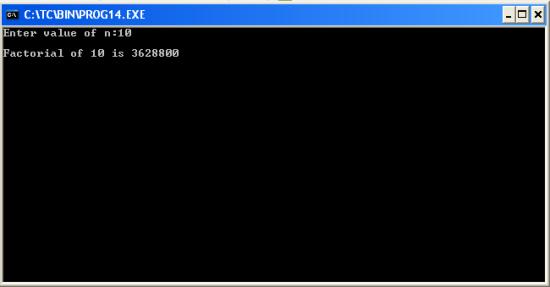
#include<stdio.h>
#include<conio.h>
void main()
{
long i,n,fac=1;
clrscr(); //to clear the screen
printf("Enter value of n:");
scanf("%ld",&n);
for(i=n;i>=1;--i)
fac*=i;
printf("
Factorial of %ld is %ld",n,fac);
getch(); //to stop the screen
}
Friday, February 13, 2015
List of all useful Turbo C keyboard shortcuts
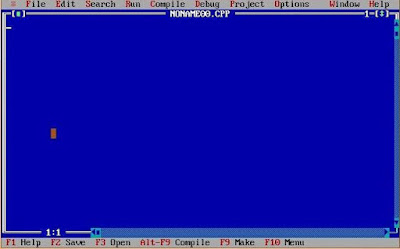
Also Read: How to write and run c/c++ programs in Ubuntu
Turbo C++ keyboard shortcuts
S.No. | Shortcuts keys | Action |
1. | F1 | For Help |
2. | F2 | Save |
3. | F3 | Open |
4. | F4 | Go to cursor |
5. | F5 | Zoom |
6. | F6 | Next |
7. | F7 | Trace into |
8. | F8 | Step over |
9. | F9 | Make |
10. | F10 | Menu |
11. | Alt+X | Quit |
12. | Alt+Bksp | Undo |
13. | Shift+Alt+Bksp | Redo |
14. | Shift+Del | Cut |
15. | Ctrl+Ins | Copy |
16. | Shift+Ins | Paste |
17. | Ctrl+Del | Clear |
18. | Ctrl+L | Search again |
19. | Alt+F7 | Previous error |
20. | Alt+F8 | Next error |
21. | Ctrl+F9 | Run |
22. | Ctrl+F2 | Program reset |
23. | Alt+F9 | Compile |
24. | Alt+F4 | Inspect |
25. | Ctrl+F4 | Evaluate/Modify |
26. | Ctrl+F3 | Call stack |
27. | Ctrl+F8 | Toggle breakpoint |
28. | Ctrl+F5 | Size/Move |
29. | Alt+F3 | Close |
30. | Alt+F5 | User screen |
31. | Alt+0 | List all |
32. | Shift+F1 | Index |
33. | Ctrl+F1 | Topic search |
34. | Alt+F1 | Previous topic |
35. | Ctrl+F7 | Add watch |